Food Delivery App
A dark, bold food delivery app with restaurant browsing, menus, and cart checkout.
About this template
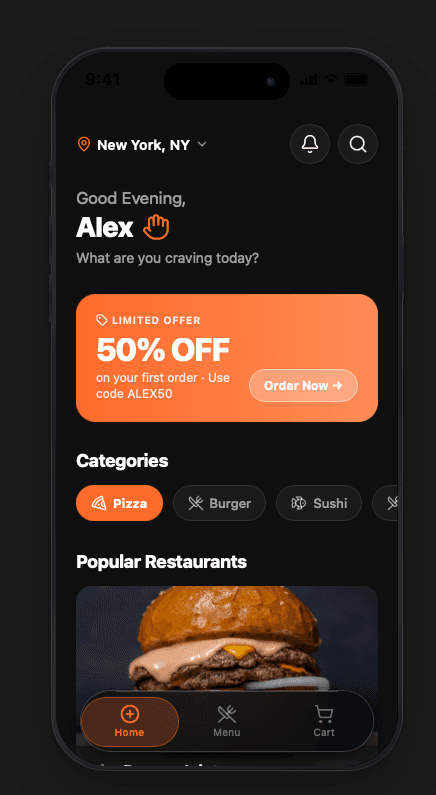
The Food Delivery template is a production-ready dark-mode ordering experience. The home screen opens with a location header, a personalised greeting, a high-contrast promo banner, horizontal category chips (Pizza, Burger, Sushi…), and a scrollable list of restaurant cards loaded with food photography.
Tapping a restaurant transitions to a full menu screen with a hero image, sticky category tabs, and item cards showing name, description, and price. The cart tab keeps a running total with per-item quantity controls, a discount code field, and a one-tap checkout button.
The near-black background (#0F0F0F) with orange accents (#FF6B2B) creates a high-energy, appetising feel that converts. Every screen is an Expo Router file — add a live order tracker, ratings, or a loyalty programme with a single prompt.
Design approach
Deep black (#0F0F0F) makes food photography pop, while a bold orange (#FF6B2B) accent drives urgency and appetite. The promo banner uses an orange-to-amber gradient with rounded corners and a "Order Now →" CTA that's impossible to miss. Restaurant cards use a LinearGradient overlay so text stays legible over any photo. The dark glassmorphic tab bar grounds the navigation without competing with the content.
What's included
Restaurant cards
Full-bleed food photography with gradient overlays, cuisine type chips, rating, and delivery time at a glance.
Category filter chips
Horizontal scrollable chips let users jump straight to Pizza, Burger, Sushi, or any category you define.
Sticky menu tabs
Menu screen uses horizontal category tabs that stick below the hero image as users scroll through items.
Interactive cart
Quantity controls, item removal, discount code input, subtotal, and a glowing checkout button all in one screen.
Promo banner
A bold gradient promotional card with headline, sub-copy, and a pill CTA drives first-order conversion.
Dark glassmorphic tab bar
A blurred dark glass panel with orange active pill keeps navigation sleek and on-brand.
Who it's for
- Food delivery startup founders
- Restaurant chains and ghost kitchens
- Grocery and convenience delivery apps
- Meal kit and subscription box products
- On-demand logistics platforms
Use cases
- Restaurant and food ordering apps
- Dark-mode e-commerce experiences
- Grocery and convenience delivery
- Meal planning and subscription boxes
- On-campus or workplace food ordering
- Multi-vendor food marketplace
How to get started
Pick the template
Click "Use this template" and the full dark-mode food delivery project loads into the ShipNative studio.
Brand it
Tell the AI your restaurant name, swap the orange accent for your brand colour, and update the category chips.
Add your menu
Ask the AI to populate the menu with your real items, prices, and photos — or wire it to a Supabase table.
Export & ship
Download the Expo project, test on device, and submit to the App Store or Play Store.
Template specs
Ready to build with this?
Open the template in ShipNative, describe your changes, and get a production-ready Expo app in minutes.
Free to use · Customize with AI · No code required